
Employee Payroll & Attendance Tracker – Excel Template

Original price was: $5.20.Current price is: $0.41.
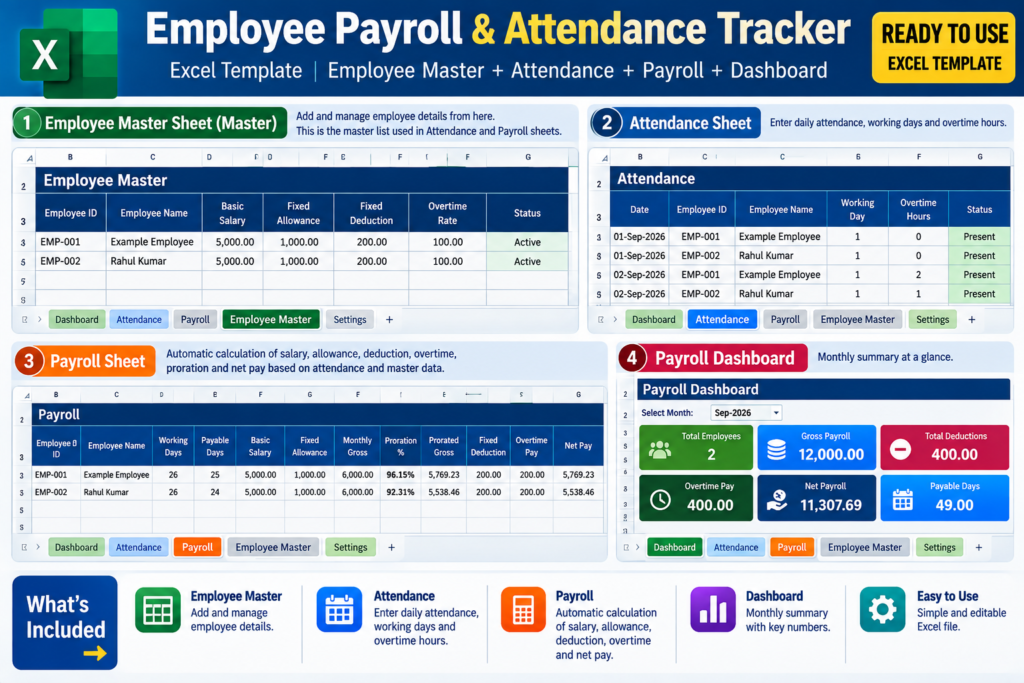
Manage employee details, attendance, monthly payroll, overtime, deductions, payment status, and payroll summary in one editable Excel workbook.
Version: Version 1.0
Requirements: Microsoft Excel (desktop or supported Excel version) Windows or macOS computer recommended Basic knowledge of Microsoft Excel Internet connection is not required for normal workbook use

Product Description & Details

Employee Payroll & Attendance Tracker – Excel Template

A practical Excel-based solution for managing employee details, attendance records, monthly payroll calculations, overtime, deductions, payment status, and payroll summary in one workbook.

This workbook is designed for small businesses, offices, shops, teams, and other workplaces that need a simple way to maintain employee and monthly payroll records without using complicated payroll software.

HOW TO USE

1. Start with the Employee Master sheet.
Enter the employee’s basic details and salary information. Each employee should have a unique Employee ID.

2. Add attendance information in the Attendance sheet.
Select or enter the Employee ID and maintain the attendance records for the required month.

3. Use the Payroll sheet for monthly payroll records.
Select the required Employee ID. Employee information such as the Employee Name is linked from the Employee Master sheet.

4. Enter or maintain the applicable payroll information such as working days, payable days, overtime hours, and payment status.

5. The workbook calculates the applicable salary figures, including monthly gross salary, proration, prorated gross, overtime pay, deductions, and net pay based on the entered data and formulas.

6. Use the Dashboard to review the payroll summary for the selected month, including employees, gross payroll, deductions, overtime pay, net payroll, payable days, and other available summary information.

IMPORTANT NOTES

• Keep Employee IDs consistent across Employee Master, Attendance, and Payroll. The Employee ID is used to connect employee information between sheets.

• Employee Name in Payroll is automatically retrieved from Employee Master. If the name does not appear correctly, first check that the Employee ID exists in Employee Master and is entered correctly.

• When using dropdown controls, click the actual cell/field you want to edit first. For example, for Status, select the Status cell and then use the dropdown belonging to that selected cell. The small dropdown icon visible near a header is not necessarily the Status selection control.

• In Employee Master, use the Status field to select the appropriate available status option for the employee.

• Do not overwrite formula cells unnecessarily. If a cell is already calculating a value automatically, enter data only in the intended input fields.

• When adding a new employee, complete the required Employee Master information first before entering that employee’s Attendance or Payroll records.

• Check the selected month carefully when reviewing the Dashboard or Payroll information. Monthly totals depend on the records entered for that month.

• Before using the workbook for actual payroll, review the employee details, attendance, salary, deductions, overtime, and payment status to make sure the entered information is correct.

• The sample/example records can be replaced with your own employee information.

WORKBOOK SHEETS

Employee Master – Maintain employee information and salary details.

Attendance – Maintain employee attendance records.

Payroll – Calculate and review monthly payroll information, including salary, proration, overtime, deductions, and net pay.

Dashboard – View a summary of the available payroll information for the selected month.

Read Me – Refer to the workbook instructions and usage guidance.

This is an editable Excel template, so you can enter your own business and employee data while keeping the existing workbook structure and formulas.

Key Features

What's Included

1 Excel Employee Payroll & Attendance Tracker workbook
Employee Master sheet
Attendance sheet
Payroll sheet
Payroll Dashboard
Read Me / usage instructions
Pre-configured formulas and calculations
Employee ID based lookup structure
Salary, overtime, deduction and net pay calculations
Payment Status tracking

Changelog

Version 1.0 – Initial Release

Initial release of the Employee Payroll & Attendance Tracker Excel Template.

Includes Employee Master, Attendance, Payroll, Dashboard, salary calculations, overtime, deductions, payment status tracking, and usage instructions.

Recommended Products

Related products you may find useful.

Uncategorized

KB Budget & Finance Planner – Google Sheets Personal Finance Template

Take control of your personal finances with the KB Budget & Finance Planner for Google Sheets. Track income and expenses, manage bills and subscriptions, plan each paycheck, compare Budget vs Actual, monitor savings goals and debt, track net worth, check your 50/30/20 budget, and plan ahead with a 30/60/90-Day Cash-Flow Forecast.

Product Description & Details

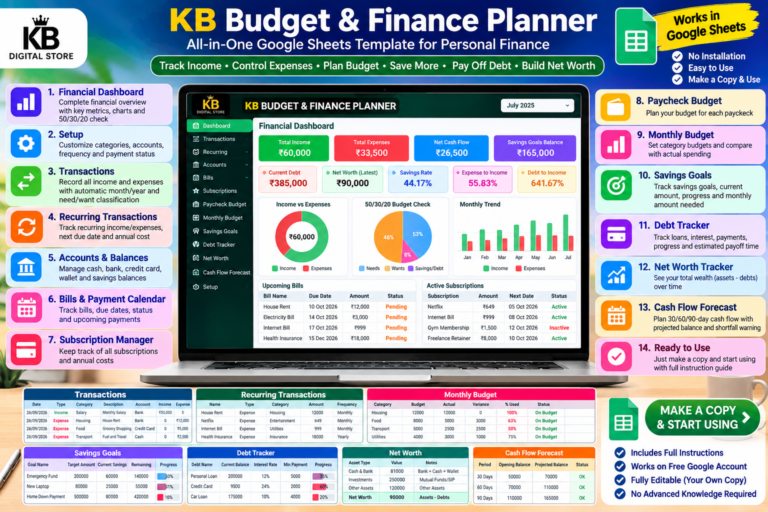
KB Budget & Finance Planner is an all-in-one Google Sheets personal finance management template designed to help you organize your income, expenses, budgets, bills, savings, debt and overall financial progress in one place.

The template includes a Financial Dashboard that brings together important metrics such as Total Income, Total Expenses, Net Cash Flow, Savings Rate, Expense-to-Income, Debt-to-Income, Savings Goals Balance, Current Debt, Net Worth, unpaid bills and recurring items.

Plan and track your finances using dedicated sections for Transactions, Recurring Transactions, Accounts & Balances, Bills & Payment Calendar, Subscription Manager, Paycheck Budget and Monthly Budget.

The Monthly Budget section lets you compare Budget vs Actual spending, view Variance and % Used, and identify categories that are within or over budget.

The planner also includes a 50/30/20 budget check, Savings Goals & Sinking Funds tracker, Debt Payoff Tracker, Net Worth Tracker and a 30/60/90-Day Cash-Flow Forecast with projected shortfall warnings.

After purchase, you will receive a Customer Access Guide containing instructions and a link to create your own Google Sheets copy of the template.

This template is intended for personal financial planning and organization. It is not financial advice.

This is a digital product. No physical item will be shipped.

Key Features

  • Financial Dashboard
  • Income & Expense Tracking
  • Recurring Transactions
  • Accounts & Balances Management
  • Bills & Payment Calendar
  • Subscription Manager
  • Paycheck Budget
  • Monthly Budget vs Actual
  • Budget Variance & % Used
  • 50/30/20 Budget Check
  • Savings Goals & Sinking Funds
  • Debt Payoff Tracker
  • Net Worth Tracker
  • Financial Health Ratios
  • 30/60/90-Day Cash-Flow Forecast
  • Projected Shortfall Warning
  • Formula-Based Automatic Calculations
  • Customizable Categories & Accounts

What's Included

KB Budget & Finance Planner Google Sheets Template
Financial Dashboard
Setup & Customizable Categories
Transactions Tracker
Recurring Transactions Tracker
Accounts & Balances
Bills & Payment Calendar
Subscription Manager
Paycheck Budget
Monthly Budget vs Actual
Savings Goals & Sinking Funds
Debt Payoff Tracker
Net Worth Tracker
30/60/90-Day Cash-Flow Forecast
Customer Access Guide PDF

Requirements

Google Account, Google Drive, Google Sheets and internet connection.

Product Version

1.0

Changelog

Version 1.0 – Initial Release

• Financial Dashboard
• Income & Expense Tracking
• Recurring Transactions
• Accounts & Balances
• Bills & Payment Calendar
• Subscription Manager
• Paycheck Budget
• Monthly Budget vs Actual
• 50/30/20 Budget Check
• Savings Goals & Sinking Funds
• Debt Payoff Tracker
• Net Worth Tracker
• Financial Health Ratios
• 30/60/90-Day Cash-Flow Forecast
• Projected Shortfall Warning
• Formula-Based Calculations
Original price was: $10.41.Current price is: $0.61. Add to cart